mirror of
https://github.com/zvx-echo6/meshai.git
synced 2026-08-26 17:31:34 +00:00
 malice
18e9ae9127
malice
18e9ae9127* chore(dashboard): untrack committed frontend build output work/meshai/dashboard/static/ held committed vite build artifacts (index.html + hashed assets/*.js|css + copied public/ images) that were last built 2026-07-07 (PR #87), 13 frontend commits ago. Docker builds the frontend fresh and overwrites these on every image build, but the pip install -e . path (documented in README Quick start) ships this stale directory verbatim via [tool.setuptools.packages.find] include. The root .gitignore already had a rule for this ("meshai/dashboard/static/") but it silently stopped matching when2e1fb325moved the source tree into work/ -- gitignore patterns containing a "/" are anchored to the .gitignore's own directory, so the unprefixed pattern only ever matched a repo-root meshai/dashboard/static/ that hasn't existed since that move. Fixed by prefixing with work/, matching the existing work/data/secrets/.env convention elsewhere in the file. Every file under static/ is generated: assets/* and index.html come from `vite build` (outDir: ../meshai/dashboard/static, emptyOutDir: true, confirmed in dashboard-frontend/vite.config.ts), and the two PNGs are vite's copy of dashboard-frontend/public/*.png (byte-identical to the source). None of it is hand-authored, so the whole directory is untracked rather than partially. Blobs remain in git history; files remain on disk, just untracked. * docs(readme): document the required frontend build for pip installs work/meshai/dashboard/static/ is no longer committed (previous commit), so the pip install -e . Quick start path now needs an explicit frontend build step or the dashboard UI silently doesn't exist. Add it, with a note clarifying the bot/API still work without it -- only the web UI is affected. Docker is unaffected (already builds the frontend in its own stage). * fix(dashboard): log clearly when the built frontend is missing Previously, if meshai/dashboard/static/ (or its index.html) was absent, create_app() silently skipped mounting /assets and registering the root/catch-all routes -- no log, no error. Any request to "/" would just 404 with FastAPI's generic "Not Found", giving no clue why. This was latent before (Docker always builds the frontend, and a git checkout with the artifacts committed always had the directory), but now that static/ is untracked, a fresh pip install without the frontend build step will hit this path as its first real-world trigger. Add a warning log naming the missing path and the exact build command, and make clear the bot/API are unaffected -- only the dashboard UI is absent. * docs(readme): move frontend-build note to root README work/README.md is about to become a symlink to root README.md on docs/single-readme. Retarget the frontend-build documentation added in56eba0f7from work/README.md to root README.md so it isn't silently dropped when that symlink lands. --------- Co-authored-by: Matt Johnson <mj@k7zvx.com>
336 lines
18 KiB
Markdown
336 lines
18 KiB
Markdown
# MeshAI
|
|
|
|
**An LLM-powered assistant for LoRa mesh networks — on Meshtastic *and* MeshCore, at the same time.**
|
|
|
|
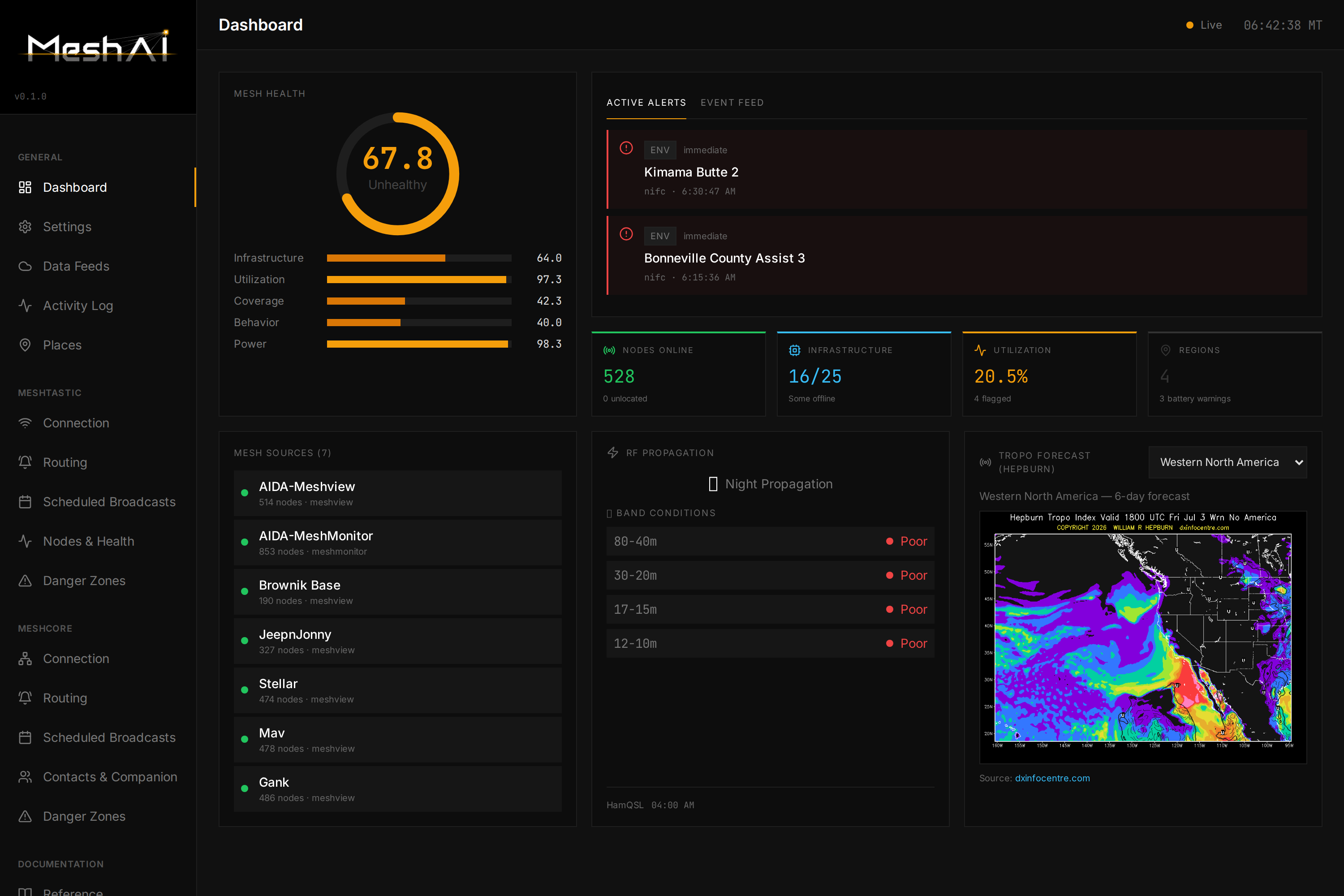
MeshAI connects to your mesh, watches network health and the world around it in real time, answers questions over the air, and broadcasts the alerts that matter — weather, wildfire, road, seismic, RF, and mesh-health — with a full web dashboard to drive it all.
|
|
|
|
> ### 🤖 Built with AI ("vibecoded")
|
|
> In the interest of transparency: **MeshAI was vibecoded** — designed, built, debugged, and documented in close collaboration with LLM coding assistants. The architecture, most of the implementation, and this README were produced that way. It's a real, running project on a live mesh, but expect the pragmatic style, opinionated shortcuts, and occasional rough edges that come with the territory. Issues and PRs are welcome.
|
|
|
|
|
|
|
|
---
|
|
|
|
## Highlights
|
|
|
|
- **Dual-transport** — runs on **Meshtastic** and **MeshCore** simultaneously. Each mesh is first-class: independent connection, routing, and behavior, one shared brain.
|
|
- **Conversational bot** — DM it "how's the mesh?" or ask about weather, fires, roads, or a specific node, and get a data-driven answer over LoRa. The reply goes back on whichever mesh you asked from.
|
|
- **Per-mesh awareness** — it watches chat on each mesh separately (rolling short-term memory), so "what's happening on the mesh?" answers about *your* mesh. Private DMs stay private; curated knowledge stays separate.
|
|
- **Broadcast intelligence** — weather alerts, wildfire updates, road/traffic, seismic, RF/band conditions, and mesh-health notifications, formatted to fit LoRa and routed per-mesh, per-family.
|
|
- **Mesh health** — a 5-pillar health score with per-region breakdowns, infrastructure monitoring, coverage-gap analysis, and battery/solar tracking (Meshtastic).
|
|
- **Web dashboard** — a clean React UI to configure every transport, route every message type, watch a live activity feed, browse contacts, and tune the bot — no config-file spelunking required.
|
|
- **Knowledge base (RAG)** — optional hybrid retrieval over a large curated vector store for survival/comms/technical Q&A.
|
|
- **Multi-backend LLM** — Google Gemini, OpenAI, Anthropic, or any OpenAI-compatible local model (Ollama, LiteLLM, etc.).
|
|
|
|
---
|
|
|
|
## The dashboard
|
|
|
|
Everything is driven from the web UI, organized into **General**, **Meshtastic**, and **MeshCore** sections — each mesh mirrors the other so there's nothing to relearn when you add the second transport.
|
|
|
|
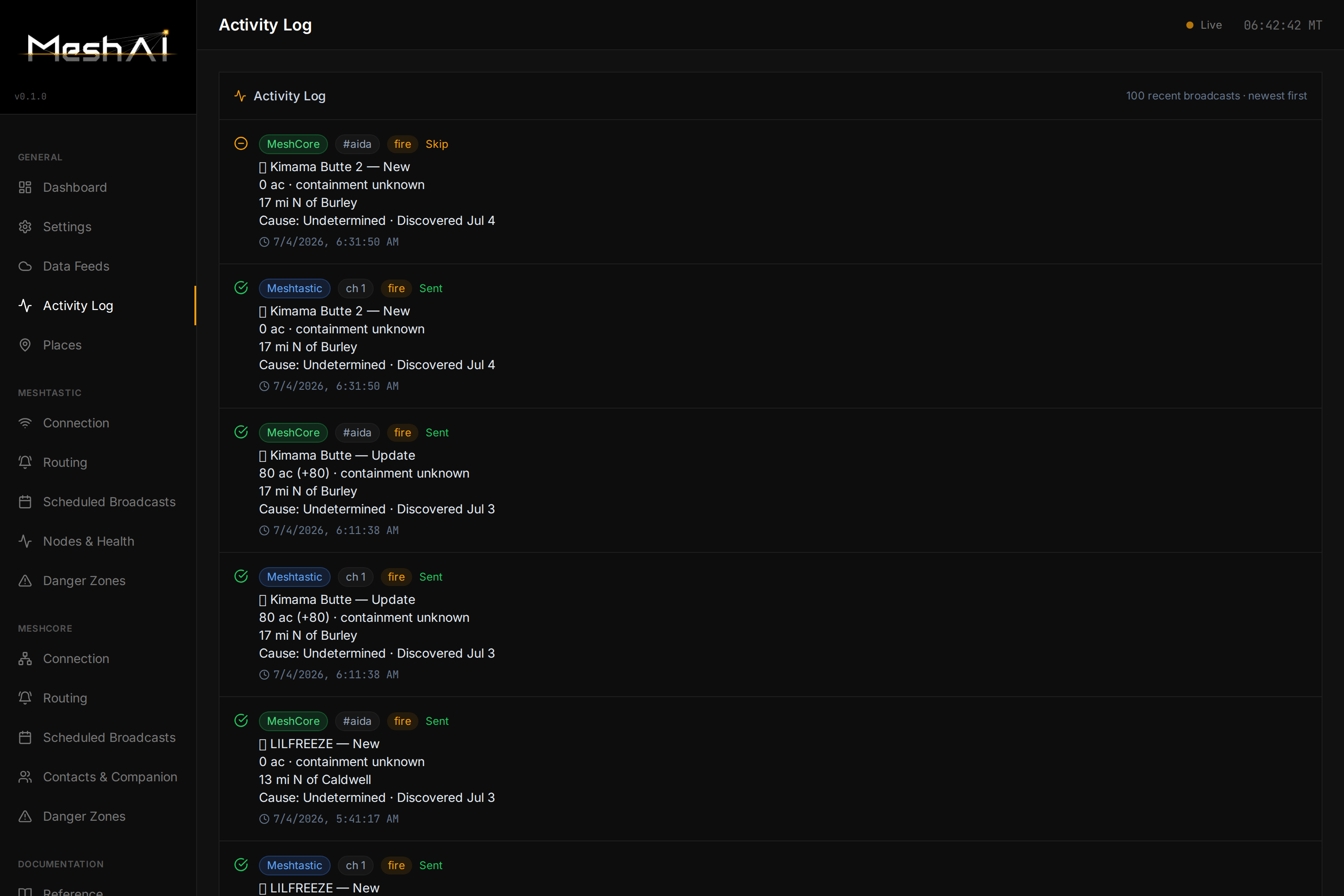
**Live activity log** — every broadcast, on both meshes, with per-mesh badges and Sent/Skip status:
|
|
|
|
|
|
|
|
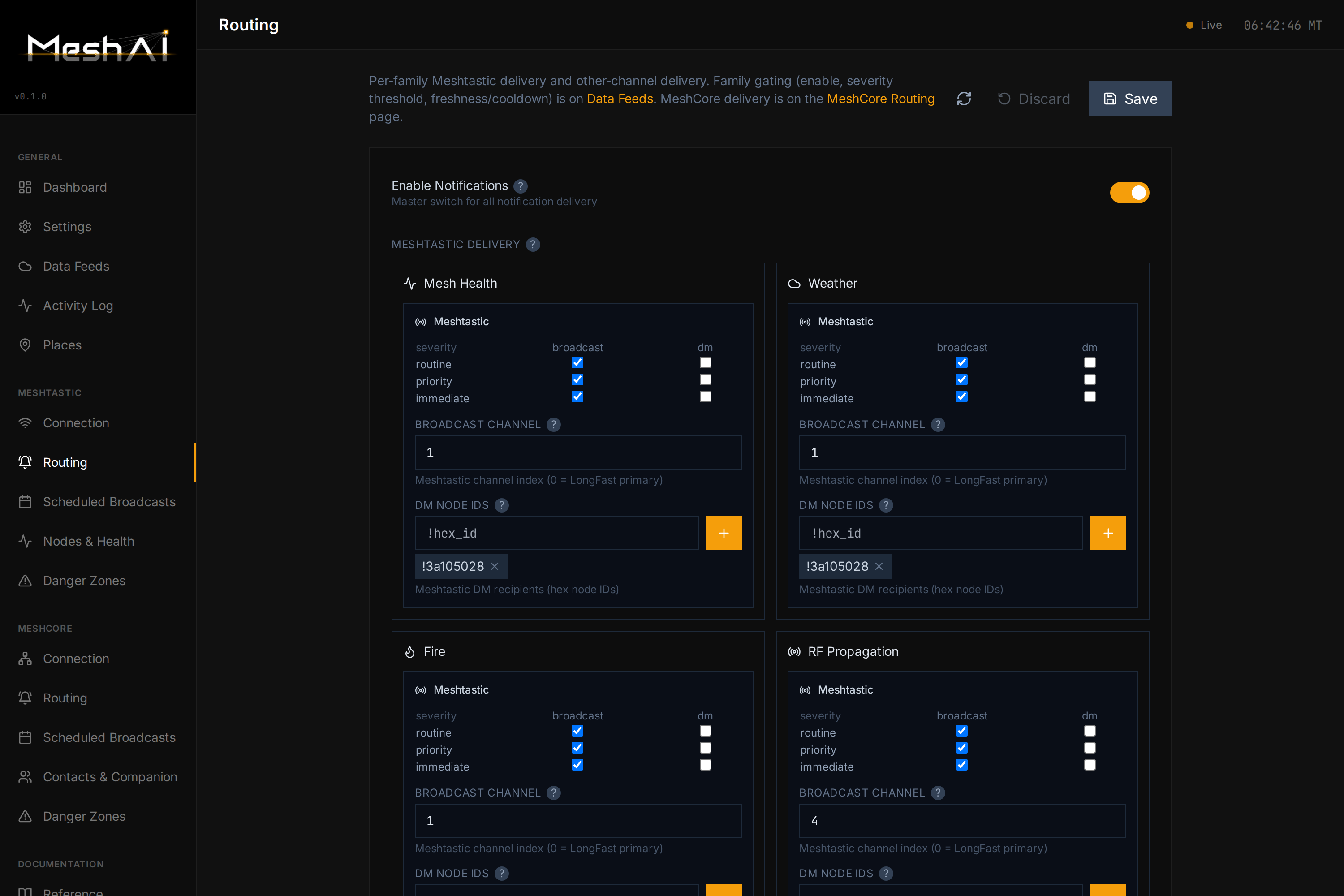
**Per-family routing** — decide exactly where each message type goes: broadcast vs. DM, which channel, which recipients — independently for each mesh:
|
|
|
|
|
|
|
|
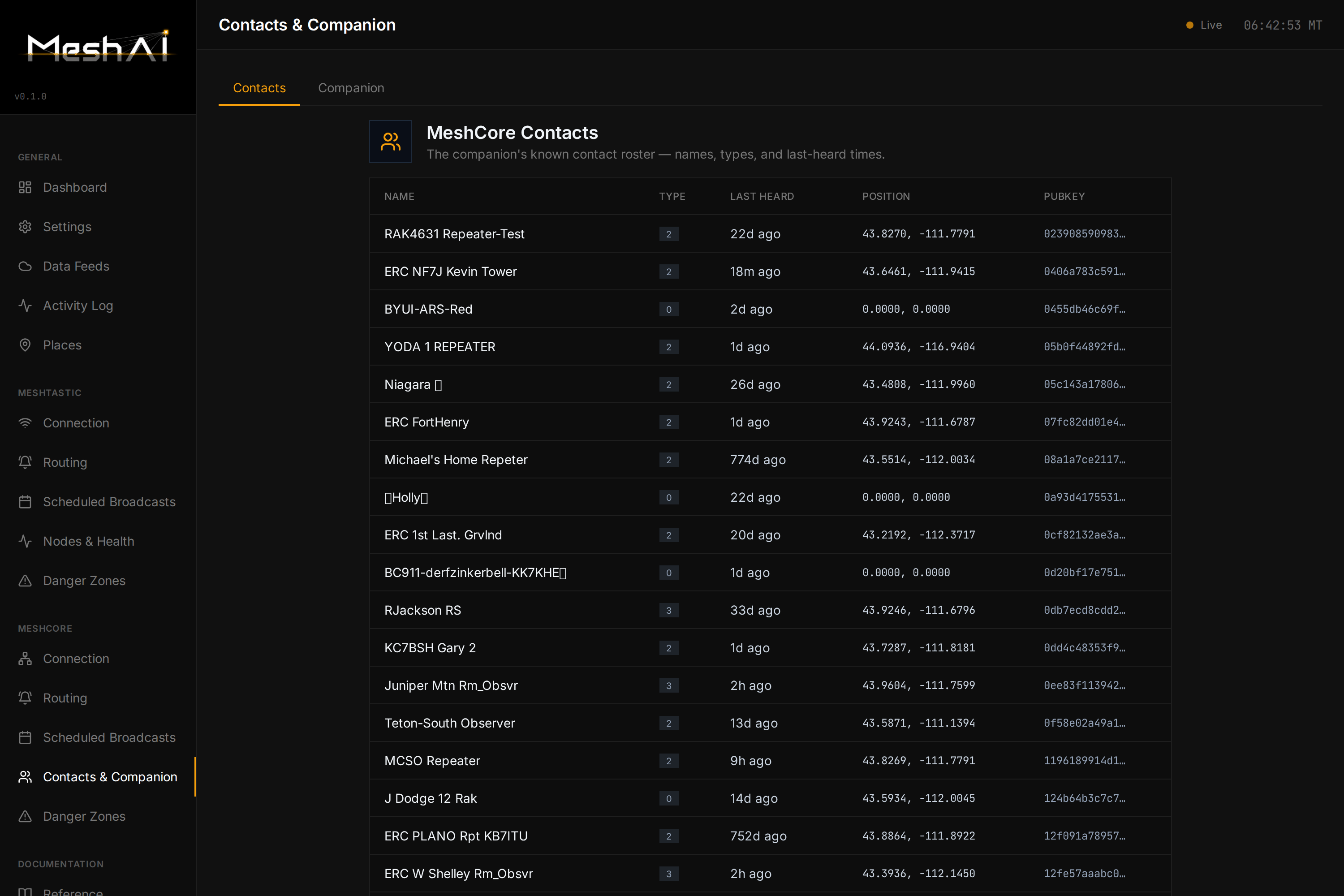
**MeshCore contacts & companion** — the live roster from your MeshCore companion node, with names, types, last-heard, position, and optional telemetry polling:
|
|
|
|
|
|
|
|
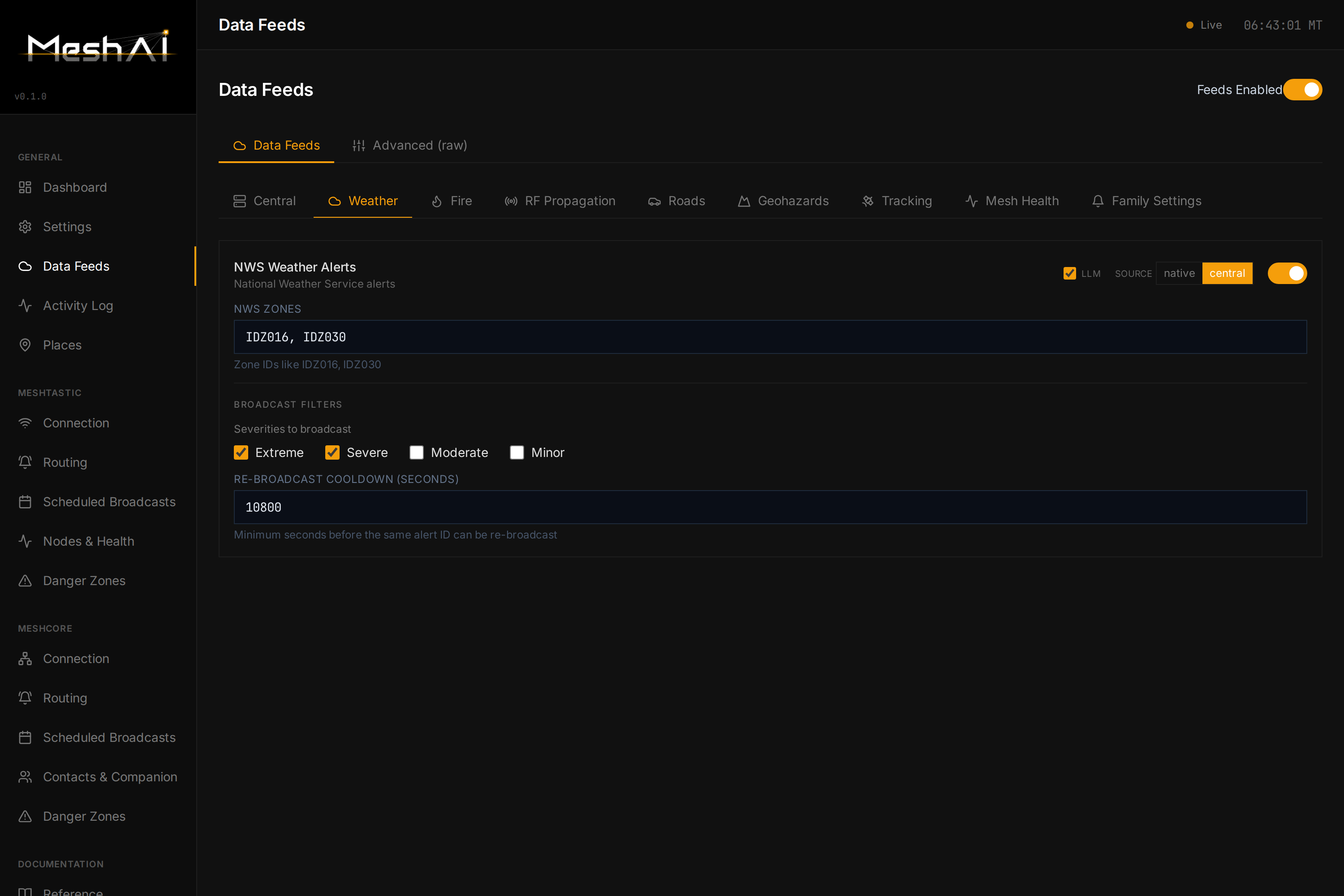
**Data feeds** — turn environmental sources on/off and tune thresholds in one place:
|
|
|
|
|
|
|
|
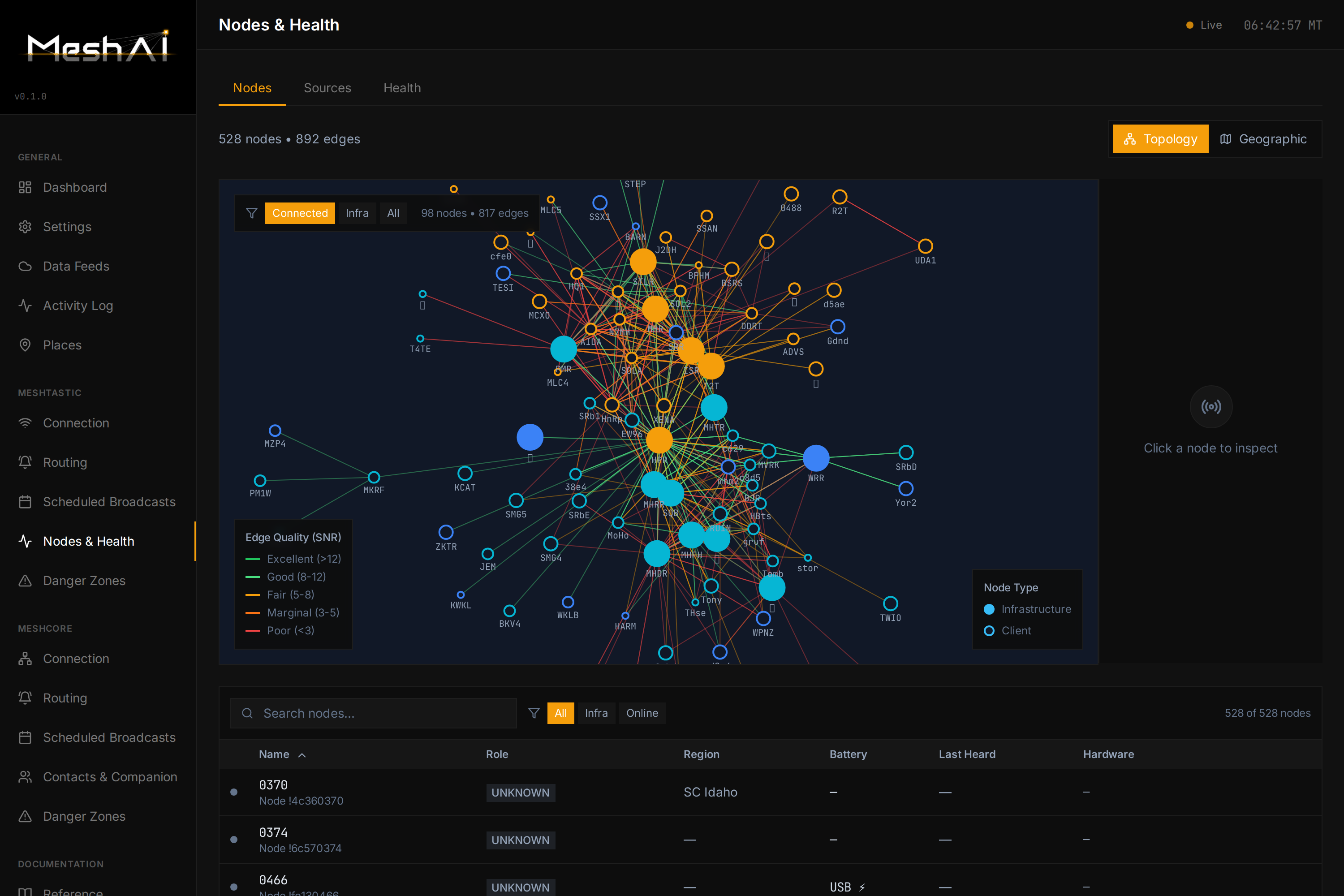
**Nodes & health** — per-node infrastructure detail: battery, utilization, coverage, neighbors, hardware:
|
|
|
|
|
|
|
|
---
|
|
|
|
## Quick start
|
|
|
|
The dashboard is the primary way to configure MeshAI — connection, LLM backend, both transports, feeds, and routing. You shouldn't need to hand-edit YAML for a normal setup.
|
|
|
|
### Docker (recommended)
|
|
|
|
```bash
|
|
mkdir -p meshai/data && cd meshai
|
|
curl -O https://raw.githubusercontent.com/zvx-echo6/meshai/main/work/docker-compose.yml
|
|
docker compose up -d
|
|
```
|
|
|
|
On first boot MeshAI writes a minimal starter config into the `meshai_data` volume (`/data/config.yaml`, plus an empty `/data/secrets/.env`) and starts the dashboard — nothing to pre-seed. Open **`http://localhost:8080`** and configure everything from there.
|
|
|
|
As you save settings, MeshAI persists them back into `/data` as focused per-domain YAML files (`llm.yaml`, `meshtastic.yaml`, `notifications.yaml`, `env_feeds.yaml`, …) alongside `config.yaml` — the same multi-file config system MeshAI uses in production; the dashboard is the intended way to drive it. API keys and other secrets you enter in the dashboard are written only to `/data/secrets/.env`, never into the YAML.
|
|
|
|
### From source (pip)
|
|
|
|
```bash
|
|
git clone https://github.com/zvx-echo6/meshai.git
|
|
cd meshai/work
|
|
cd dashboard-frontend && npm ci && npm run build && cd .. # builds the web dashboard — required, see note
|
|
pip install -e .
|
|
cp config.example.yaml config.yaml # minimal starting point, not exhaustive — see note below
|
|
meshai
|
|
```
|
|
|
|
> **The frontend build step is required.** `meshai/dashboard/static/` is no longer
|
|
> committed to the repo, so skipping it means no dashboard UI is served (the bot and
|
|
> API still run fine). Docker users don't need this — the image builds the frontend
|
|
> automatically. Requires Node.js/npm.
|
|
|
|
Unlike Docker, `meshai` won't create a config file for you — it needs one to exist before it will start. `config.example.yaml` bootstraps the basics (connection, LLM backend, bot behavior); once it's running, open `http://localhost:8080` and use the dashboard for everything else.
|
|
|
|
> **Note on `config.example.yaml`:** it documents the legacy single-file schema and is no longer complete — it predates `coverage`, `danger_zones`, `generic_sources`, `meshcore_context`, `commands`, and the current 8-family notification-routing model (`notifications.toggles` / `destinations` / `region_routes`). The legacy single-file loader still works and is fully supported, but the dashboard — backed by the full config schema — is the authoritative way to reach every setting. Don't treat this file as a complete reference.
|
|
|
|
### Advanced: the split `/data/config/` layout
|
|
|
|
Production and multi-operator deployments typically move to a fully split config directory — `/data/config/config.yaml` plus one file per domain, `local.yaml` for operator-identifying values, and `!include` orchestration — instead of the single flat file above. MeshAI loads this layout automatically whenever it's present. To convert an existing single-file install:
|
|
|
|
```bash
|
|
docker compose exec meshai python -m meshai.scripts.migrate_config_v03
|
|
```
|
|
|
|
This backs up the original `config.yaml`, splits it into `/data/config/`, extracts secrets to `/data/secrets/.env`, and verifies the new layout loads identically before finishing — restart the container afterward to pick it up. It's optional: the dashboard is fully functional against either layout. (Templates for building a split layout from scratch also ship in the repo's `work/config/` directory: `local.yaml.example`, `.env.example`.)
|
|
|
|
---
|
|
|
|
## Transports
|
|
|
|
MeshAI speaks two mesh protocols. **Meshtastic is always the base transport.** **MeshCore turns on automatically the moment you set a MeshCore host** — there's no separate on/off toggle to forget.
|
|
|
|
### Meshtastic
|
|
|
|
Connect over TCP (recommended) or serial:
|
|
|
|
```yaml
|
|
connection:
|
|
type: "tcp" # or "serial"
|
|
tcp_host: "192.168.1.100"
|
|
tcp_port: 4403
|
|
# serial_port: "/dev/ttyUSB0"
|
|
```
|
|
|
|
### MeshCore
|
|
|
|
MeshAI attaches to a MeshCore **companion** (the pyMC / MeshCore companion frame server) over TCP and acts as a node on the MeshCore mesh:
|
|
|
|
```yaml
|
|
connection:
|
|
meshcore_host: "192.168.1.253" # blank = MeshCore off
|
|
meshcore_port: 5050
|
|
```
|
|
|
|
Once connected, MeshCore gets its own **Connection**, **Routing**, **Scheduled Broadcasts**, **Contacts & Companion**, and **Danger Zones** pages in the dashboard — the same capabilities as Meshtastic, using MeshCore's own idioms (channels by name, contacts by pubkey). Messages are sized to fit whichever mesh they go out on.
|
|
|
|
---
|
|
|
|
## The conversational bot
|
|
|
|
DM MeshAI on either mesh and it answers with the LLM, using live mesh data, environmental feeds, and (optionally) a knowledge base. A few things it's careful about:
|
|
|
|
- **Answers on the mesh you asked from.** A MeshCore DM gets a MeshCore reply; a Meshtastic DM gets a Meshtastic reply. Each mesh's "answer DMs" switch is independent.
|
|
- **Per-mesh chat memory.** It keeps a short rolling window of recent channel chatter *per mesh* (configurable retention, default 14 days) so "what's happening on the mesh?" reflects the mesh you're on. Ask about the other mesh by name to cross over.
|
|
- **Three separate lanes.** Shared channel context, your private DM history, and the curated knowledge base never bleed into each other.
|
|
- **LoRa-fit replies.** Responses are chunked to a per-mesh character budget with sentence-aware splitting and continuation prompts.
|
|
|
|
### Commands
|
|
|
|
Alongside natural-language questions, a set of `!` commands are available (all toggleable, so they can defer to another service like MeshMonitor):
|
|
|
|
| Category | Commands |
|
|
|----------|----------|
|
|
| Mesh | `!health` · `!mesh` · `!status` · `!region [name]` · `!neighbors [node]` |
|
|
| Weather / RF | `!wx-alerts` · `!solar` · `!hf` · `!satpass` |
|
|
| Fire | `!fire` · `!hotspots` · `!ignitions` |
|
|
| Hazards | `!avalanche` · `!roads` / `!traffic` · `!rivers` / `!gauges` |
|
|
| Utility | `!help` · `!clear` |
|
|
|
|
---
|
|
|
|
## Mesh intelligence (Meshtastic)
|
|
|
|
MeshAI continuously aggregates mesh data and computes a **5-pillar health score**:
|
|
|
|
| Pillar | Weight | Measures |
|
|
|--------|--------|----------|
|
|
| Infrastructure | 30% | Router/repeater uptime |
|
|
| Utilization | 25% | Channel busyness / RF congestion |
|
|
| Coverage | 20% | How many monitoring sources see each node |
|
|
| Behavior | 15% | Traffic patterns (noisy/misconfigured nodes) |
|
|
| Power | 10% | Battery health of infrastructure nodes |
|
|
|
|
Infrastructure nodes are tracked individually (battery, offline alerts, coverage, neighbors, hardware); client nodes coming and going is normal and ignored. Regions are fully configurable — local names, aliases, cities, and radius — with no hardcoded geography.
|
|
|
|
Data comes from one or more **Meshview** instances and a **MeshMonitor** instance, polled on a staggered schedule with built-in rate-limiting:
|
|
|
|
```yaml
|
|
mesh_sources:
|
|
- name: "meshview"
|
|
type: meshview
|
|
url: "http://192.168.1.100:8080"
|
|
enabled: true
|
|
- name: "meshmonitor"
|
|
type: meshmonitor
|
|
url: "http://192.168.1.100:3333"
|
|
api_token: "your-bearer-token"
|
|
enabled: true
|
|
```
|
|
|
|
---
|
|
|
|
## Environmental & hazard feeds
|
|
|
|
MeshAI pulls real-time situational data and turns it into LoRa broadcasts and query answers. Sources include **NWS weather alerts**, **NIFC wildfire perimeters**, **NASA FIRMS satellite fire detections**, **USGS earthquakes**, **USGS stream gauges**, **road/traffic (511 / TomTom)**, **NOAA space weather**, and **avalanche/RF-propagation** feeds.
|
|
|
|
Everything is switched on/off and tuned from the dashboard's **Data Feeds** page — enable a source, set thresholds and geography, and route its output per-mesh on the **Routing** page. Broadcast wording is tightened to fit a single LoRa packet without dropping the important details (e.g. affected towns on a weather alert).
|
|
|
|
### Native adapters vs. Central
|
|
|
|
Each hazard feed can get its data one of two ways, chosen per-feed with a `feed_source` switch:
|
|
|
|
- **`native`** — MeshAI fetches the source's public API **directly** (api.weather.gov, NIFC, USGS, NOAA SWPC, NASA FIRMS, TomTom, 511, avalanche centers). Self-contained — no extra infrastructure. This is the default and the original data path.
|
|
- **`central`** — MeshAI subscribes to **Central**, a companion service that pre-aggregates the same hazard data and republishes it as a **NATS JetStream** firehose, so many bots/nodes can share one set of upstream API calls and geo/severity filtering instead of each hammering the source APIs.
|
|
|
|
```yaml
|
|
environmental:
|
|
central:
|
|
enabled: true
|
|
url: "nats://central.echo6.mesh:4222" # NATS server (tailnet-gated, no auth)
|
|
durable: "meshai-consumer" # durable consumer name prefix
|
|
region: "us.id" # server-side subject filtering
|
|
connect_timeout: 10
|
|
nws: { feed_source: central } # this feed comes from Central …
|
|
fires: { feed_source: native } # … this one is fetched directly
|
|
# …one feed_source per hazard adapter
|
|
```
|
|
|
|
Native and Central are **mutually exclusive per feed** — flip any adapter between them independently. Two special cases: **`satpass`** is Central-only (there's no native predictor), and **`ducting`** (VHF tropo) is native-only (no Central equivalent). MeshAI keeps running whether or not Central is up: a **runtime** drop auto-reconnects (durable consumers resume where they left off), and a **startup** outage is logged and retried in the background rather than blocking boot — the LLM bot, both transports, mesh-health, and any `native` feeds all come up regardless; only the Central-sourced hazard feeds wait for Central to return. Feeds set to `native` don't depend on Central at all.
|
|
|
|
---
|
|
|
|
## Knowledge base (RAG)
|
|
|
|
Optional hybrid retrieval for survival, comms, medical, and technical Q&A.
|
|
|
|
- **Primary** — queries a **Qdrant** hybrid store (dense `bge-m3` + sparse, Reciprocal Rank Fusion) over a large curated vector set, via a networked TEI embedding service. Nothing is copied locally.
|
|
- **Fallback** — a local **SQLite** knowledge base (FTS5 keyword + `bge-small-en-v1.5` vectors) if the vector service is unreachable.
|
|
|
|
```yaml
|
|
knowledge:
|
|
enabled: true
|
|
backend: auto # qdrant | sqlite | auto
|
|
qdrant_host: "192.168.1.150"
|
|
qdrant_port: 6333
|
|
qdrant_collection: "recon_knowledge_hybrid"
|
|
tei_host: "192.168.1.150"
|
|
tei_port: 8090
|
|
top_k: 5
|
|
```
|
|
|
|
The curated channel chatter your bot observes is used only as short-term *context* — it is never written into the knowledge base.
|
|
|
|
---
|
|
|
|
## LLM configuration
|
|
|
|
```yaml
|
|
llm:
|
|
backend: "google" # google | openai | anthropic
|
|
api_key: "your-api-key"
|
|
model: "gemini-2.5-flash"
|
|
```
|
|
|
|
Any OpenAI-compatible endpoint works for local models — point `base_url` at Ollama (`http://localhost:11434/v1`), LiteLLM (`http://localhost:4000/v1`), or Open WebUI.
|
|
|
|
---
|
|
|
|
## Architecture
|
|
|
|
```
|
|
┌─────────────────────────────┐
|
|
Meshtastic ────────▶│ │◀──────── MeshCore
|
|
(TCP / serial) │ CompositeTransport │ (companion / pyMC TCP)
|
|
│ per-mesh routing + sizing │
|
|
└──────────────┬──────────────┘
|
|
│
|
|
┌─────────────────────────────┼─────────────────────────────┐
|
|
▼ ▼ ▼
|
|
┌───────────┐ ┌─────────────────┐ ┌──────────────┐
|
|
│ Router │ │ Notification │ │ Mesh Data │
|
|
│ LLM / cmd │ │ Pipeline │ │ Store + │
|
|
│ DM gating │ │ weather · fire │ │ Health │
|
|
│ per-mesh │ │ road · seismic │ │ Engine │
|
|
│ context │ │ RF · mesh-health│ │ 5-pillar │
|
|
└─────┬─────┘ └────────┬─────────┘ └──────┬───────┘
|
|
│ │ │
|
|
┌────▼─────┐ ┌──────────────┐ │ ┌──────────────┐ │
|
|
│ LLM │ │ Knowledge │ │ │ Env / Central │◀─────┘
|
|
│ backend │ │ Qdrant/FTS5 │ │ │ feed adapters │
|
|
└──────────┘ └──────────────┘ ▼ └──────────────┘
|
|
┌──────────┐
|
|
│ Responder│ ACK-paced, LoRa-fit,
|
|
│ + Chunker│ routed per mesh
|
|
└──────────┘
|
|
│
|
|
Web Dashboard (React) ── configure everything
|
|
```
|
|
|
|
---
|
|
|
|
## Running as a service
|
|
|
|
```ini
|
|
# /etc/systemd/system/meshai.service
|
|
[Unit]
|
|
Description=MeshAI
|
|
After=network.target
|
|
|
|
[Service]
|
|
Type=simple
|
|
User=your-user
|
|
WorkingDirectory=/path/to/meshai
|
|
ExecStart=/usr/bin/python3 -m meshai
|
|
Restart=always
|
|
RestartSec=10
|
|
|
|
[Install]
|
|
WantedBy=multi-user.target
|
|
```
|
|
|
|
```bash
|
|
sudo systemctl daemon-reload
|
|
sudo systemctl enable --now meshai
|
|
```
|
|
|
|
Every deployment is designed to survive a reboot; the dashboard's connection settings drive both transports.
|
|
|
|
---
|
|
|
|
## Playing nice with other services
|
|
|
|
- **advBBS** — MeshAI coexists on the same Meshtastic node; BBS protocol traffic (sync, RAP, mail) is auto-filtered (`bot.filter_bbs_protocols: true`).
|
|
- **MeshMonitor** — MeshAI reads MeshMonitor's auto-responder patterns to avoid duplicate replies, and uses its API as a mesh-intelligence data source.
|
|
- **MeshCore companion** — MeshAI attaches as its own companion identity so it can share the radio without evicting other companion clients.
|
|
|
|
---
|
|
|
|
## Acknowledgments
|
|
|
|
- [Meshtastic](https://meshtastic.org/) — the mesh platform it started on
|
|
- [MeshCore](https://meshcore.io/) & [pyMC](https://github.com/rightup/pyMC_core) — the second transport
|
|
- [MeshMonitor](https://github.com/Yeraze/meshmonitor) by Yeraze — monitoring integration & data source
|
|
- [advBBS](https://github.com/zvx-echo6/advbbs) — coexistence design
|
|
- [Qdrant](https://github.com/qdrant/qdrant) · [sqlite-vec](https://github.com/asg017/sqlite-vec) · [fastembed](https://github.com/qdrant/fastembed) — retrieval stack
|
|
- The LLM coding assistants that vibecoded most of this
|
|
|
|
## License
|
|
|
|
MIT
|
|
|
|
## Author
|
|
|
|
K7ZVX — matt@echo6.co
|