 malice
2c46c9104d
malice
2c46c9104d* feat(region-routing): P1 tagging + region_routes primitive + read/write API + preview launcher - config.py: add Coverage.region_tagging (bool=False); add RegionRouteMatrix dataclass (enabled, cells) above NotificationsConfig; add region_routes field to NotificationsConfig; add explicit hydration branch for region_routes in _dict_to_dataclass mirroring destinations pattern. - coverage_area.py: add MonitoringArea.name (str|None=None, frozen); update areas_from_config to preserve name; refactor inline geom extraction from classify_event_areas into shared _event_geom_json helper; add matching_area_names(geom_json, areas)->list[str] (additive, all named matches, config-order, deduped; gate unchanged); add event_region_names convenience wrapper. - coverage_filter.py: add region_tagging ctor kwarg; stamp event.region/ regions before the gate when region_tagging=True and areas non-empty and not event.regions (never clobbers satpass preset). - pipeline/__init__.py: wire region_tagging into CoverageFilter construction. - notification_routes.py: add GET /notifications/regions (named coverage area names, config-order, deduped); GET /notifications/region-routing (matrix as JSON); POST /notifications/region-routing (explicit RMW — only region_routes changes, toggles/rules/destinations survive). - scripts/preview_dashboard.py: mesh-free launcher — dashboard API only, no mesh connector, no broadcast loop; vite runs separately. All 87 coverage tests pass; 300 total pass; 6 pre-existing failures unchanged (adapter config count mismatch + MeshCore EventType.NEW_CONTACT). * feat(region-routing): manual region x family matrix editor page Adds RegionRoutingMatrix.tsx — a plain editor over the region_routes config primitive. Rows = families (via useFamilies()), cols = regions (from GET /api/notifications/regions). Each cell exposes MT channel (ChannelPicker single + includeDisabled), MC channel name (text input), min_severity select (routine/priority/critical/immediate), and an enabled checkbox. Only cells where MT or MC is set are included in the sparse POST payload. Master enable toggle maps to top-level enabled. MT budget guard warns when more than 7 distinct MT indices are in use. Sticky family column; horizontal scroll for wide region sets. Registers route /region-routing in App.tsx and adds "Region Routing" nav entry (Map icon) under the Meshtastic section in Layout.tsx, immediately after Routing. Co-Authored-By: Claude Sonnet 4.6 <noreply@anthropic.com> * fix(region-routing): regions endpoint reads saved (disk) coverage so routing columns are dynamic without a bot restart; preview reloads config after writes * feat(routing): unify MT/MC routing into per-family cards; region routing as an in-card expand; remove rules/destinations UI + standalone page * refactor(routing): move Meshtastic Routing from /notifications to /meshtastic/routing (mirror /meshcore/routing); redirect legacy path * feat(region-routing): dispatcher honors region_routes matrix (authoritative-on-match, per-region cooldown, per-channel dedup); non-matrix path unchanged Co-Authored-By: Claude Opus 4.8 (1M context) <noreply@anthropic.com> * fix(region-routing): matrix dedup key must match boot-restore 2-tuple form (prevents restart re-broadcast flood); regression test --------- Co-authored-by: Matt Johnson <mj@k7zvx.com> Co-authored-by: Claude Sonnet 4.6 <noreply@anthropic.com> |
||
|---|---|---|
| .. | ||
| src | ||
| LICENSE | ||
| package.json | ||
| README.md | ||
d3-chord
Visualize relationships or network flow with an aesthetically-pleasing circular layout.
Installing
If you use npm, npm install d3-chord. You can also download the latest release on GitHub. For vanilla HTML in modern browsers, import d3-chord from Skypack:
<script type="module">

import {chord} from "https://cdn.skypack.dev/d3-chord@3";

const c = chord();

</script>
For legacy environments, you can load d3-chord’s UMD bundle from an npm-based CDN such as jsDelivr; a d3 global is exported:
<script src="https://cdn.jsdelivr.net/npm/d3-path@3"></script>
<script src="https://cdn.jsdelivr.net/npm/d3-chord@3"></script>
<script>

const chord = d3.chord();

</script>
API Reference
Constructs a new chord layout with the default settings.
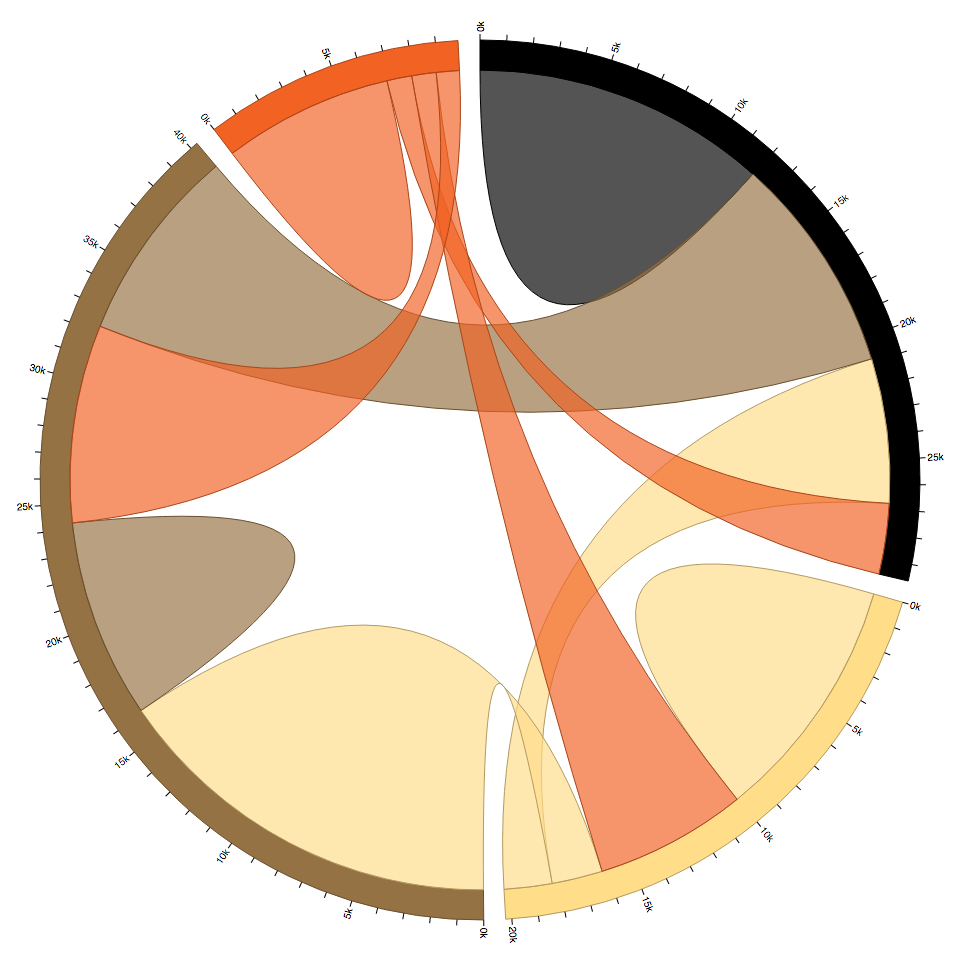
Computes the chord layout for the specified square matrix of size n×n, where the matrix represents the directed flow amongst a network (a complete digraph) of n nodes. The given matrix must be an array of length n, where each element matrix[i] is an array of n numbers, where each matrix[i][j] represents the flow from the ith node in the network to the jth node. Each number matrix[i][j] must be nonnegative, though it can be zero if there is no flow from node i to node j. From the Circos tableviewer example:
const matrix = [
  [11975,  5871, 8916, 2868],
  [ 1951, 10048, 2060, 6171],
  [ 8010, 16145, 8090, 8045],
  [ 1013,   990,  940, 6907]
];
The return value of chord(matrix) is an array of chords, where each chord represents the combined bidirectional flow between two nodes i and j (where i may be equal to j) and is an object with the following properties:
source- the source subgrouptarget- the target subgroup
Each source and target subgroup is also an object with the following properties:
startAngle- the start angle in radiansendAngle- the end angle in radiansvalue- the flow value matrix[i][j]index- the node index i
The chords are typically passed to d3.ribbon to display the network relationships. The returned array includes only chord objects for which the value matrix[i][j] or matrix[j][i] is non-zero. Furthermore, the returned array only contains unique chords: a given chord ij represents the bidirectional flow from i to j and from j to i, and does not contain a duplicate chord ji; i and j are chosen such that the chord’s source always represents the larger of matrix[i][j] and matrix[j][i].
The chords array also defines a secondary array of length n, chords.groups, where each group represents the combined outflow for node i, corresponding to the elements matrix[i][0 … n - 1], and is an object with the following properties:
startAngle- the start angle in radiansendAngle- the end angle in radiansvalue- the total outgoing flow value for node iindex- the node index i
The groups are typically passed to d3.arc to produce a donut chart around the circumference of the chord layout.
# chord.padAngle([angle]) · Source
If angle is specified, sets the pad angle between adjacent groups to the specified number in radians and returns this chord layout. If angle is not specified, returns the current pad angle, which defaults to zero.
# chord.sortGroups([compare]) · Source
If compare is specified, sets the group comparator to the specified function or null and returns this chord layout. If compare is not specified, returns the current group comparator, which defaults to null. If the group comparator is non-null, it is used to sort the groups by their total outflow. See also d3.ascending and d3.descending.
# chord.sortSubgroups([compare]) · Source
If compare is specified, sets the subgroup comparator to the specified function or null and returns this chord layout. If compare is not specified, returns the current subgroup comparator, which defaults to null. If the subgroup comparator is non-null, it is used to sort the subgroups corresponding to matrix[i][0 … n - 1] for a given group i by their total outflow. See also d3.ascending and d3.descending.
# chord.sortChords([compare]) · Source
If compare is specified, sets the chord comparator to the specified function or null and returns this chord layout. If compare is not specified, returns the current chord comparator, which defaults to null. If the chord comparator is non-null, it is used to sort the chords by their combined flow; this only affects the z-order of the chords. See also d3.ascending and d3.descending.
# d3.chordDirected() · Source, Examples
A chord layout for directional flows. The chord from i to j is generated from the value in matrix[i][j] only.
# d3.chordTranspose() · Source
A transposed chord layout. Useful to highlight outgoing (rather than incoming) flows.
Creates a new ribbon generator with the default settings.
Generates a ribbon for the given arguments. The arguments are arbitrary; they are simply propagated to the ribbon generator’s accessor functions along with the this object. For example, with the default settings, a chord object expected:
const ribbon = d3.ribbon();

ribbon({
  source: {startAngle: 0.7524114, endAngle: 1.1212972, radius: 240},
  target: {startAngle: 1.8617078, endAngle: 1.9842927, radius: 240}
}); // "M164.0162810494058,-175.21032946354026A240,240,0,0,1,216.1595644740915,-104.28347273835429Q0,0,229.9158815306728,68.8381247563705A240,240,0,0,1,219.77316791012538,96.43523560788266Q0,0,164.0162810494058,-175.21032946354026Z"
Or equivalently if the radius is instead defined as a constant:
const ribbon = d3.ribbon()
    .radius(240);

ribbon({
  source: {startAngle: 0.7524114, endAngle: 1.1212972},
  target: {startAngle: 1.8617078, endAngle: 1.9842927}
}); // "M164.0162810494058,-175.21032946354026A240,240,0,0,1,216.1595644740915,-104.28347273835429Q0,0,229.9158815306728,68.8381247563705A240,240,0,0,1,219.77316791012538,96.43523560788266Q0,0,164.0162810494058,-175.21032946354026Z"
If the ribbon generator has a context, then the ribbon is rendered to this context as a sequence of path method calls and this function returns void. Otherwise, a path data string is returned.
# ribbon.source([source]) · Source
If source is specified, sets the source accessor to the specified function and returns this ribbon generator. If source is not specified, returns the current source accessor, which defaults to:
function source(d) {
  return d.source;
}
# ribbon.target([target]) · Source
If target is specified, sets the target accessor to the specified function and returns this ribbon generator. If target is not specified, returns the current target accessor, which defaults to:
function target(d) {
  return d.target;
}
# ribbon.radius([radius]) · Source
If radius is specified, sets the source and target radius accessor to the specified function and returns this ribbon generator. If radius is not specified, returns the current source radius accessor, which defaults to:
function radius(d) {
  return d.radius;
}
# ribbon.sourceRadius([radius]) · Source
If radius is specified, sets the source radius accessor to the specified function and returns this ribbon generator. If radius is not specified, returns the current source radius accessor, which defaults to:
function radius(d) {
  return d.radius;
}
# ribbon.targetRadius([radius]) · Source
If radius is specified, sets the target radius accessor to the specified function and returns this ribbon generator. If radius is not specified, returns the current target radius accessor, which defaults to:
function radius(d) {
  return d.radius;
}
By convention, the target radius in asymmetric chord diagrams is typically inset from the source radius, resulting in a gap between the end of the directed link and its associated group arc.
# ribbon.startAngle([angle]) · Source
If angle is specified, sets the start angle accessor to the specified function and returns this ribbon generator. If angle is not specified, returns the current start angle accessor, which defaults to:
function startAngle(d) {
  return d.startAngle;
}
The angle is specified in radians, with 0 at -y (12 o’clock) and positive angles proceeding clockwise.
# ribbon.endAngle([angle]) · Source
If angle is specified, sets the end angle accessor to the specified function and returns this ribbon generator. If angle is not specified, returns the current end angle accessor, which defaults to:
function endAngle(d) {
  return d.endAngle;
}
The angle is specified in radians, with 0 at -y (12 o’clock) and positive angles proceeding clockwise.
# ribbon.padAngle([angle]) · Source
If angle is specified, sets the pad angle accessor to the specified function and returns this ribbon generator. If angle is not specified, returns the current pad angle accessor, which defaults to:
function padAngle() {
  return 0;
}
The pad angle specifies the angular gap between adjacent ribbons.
# ribbon.context([context]) · Source
If context is specified, sets the context and returns this ribbon generator. If context is not specified, returns the current context, which defaults to null. If the context is not null, then the generated ribbon is rendered to this context as a sequence of path method calls. Otherwise, a path data string representing the generated ribbon is returned. See also d3-path.
Creates a new arrow ribbon generator with the default settings.
# ribbonArrow.headRadius([radius]) · Source
If radius is specified, sets the arrowhead radius accessor to the specified function and returns this ribbon generator. If radius is not specified, returns the current arrowhead radius accessor, which defaults to:
function headRadius() {
  return 10;
}