 a528166f7f
gating/firms.py's decide() stamped a plain "severity" key in the
data_patch for the wildfire_spotting and wildfire_halted broadcast
paths. central/consumer.py only ever promotes data["_severity_override"]
onto Event.severity -- the plain key is a silent no-op, the same class
of bug as #118 (fixed for firms_handler.py's own inline stamps in
PR #120). Currently inert (MESHAI_CUTOVER_CATEGORIES is unset by
default), but the moment wildfire_spotting/wildfire_halted are cut
over, spotting would silently stop being "immediate".
- gating/firms.py: both data_patch sites now use _severity_override.
Checked the other gating modules (fire.py, avalanche.py, swpc.py,
quake.py, nws.py) -- all already use _severity_override correctly;
firms.py was the only one with the plain-key mistake.
- Fixed the stale module docstring claiming the unattributed-hotspot
cluster path "is DEAD" -- it has been live since
|
||
|---|---|---|
| .. | ||
| config | ||
| dashboard-frontend | ||
| docs | ||
| meshai | ||
| scripts | ||
| tests | ||
| config.example.yaml | ||
| docker-compose.yml | ||
| docker-entrypoint.sh | ||
| Dockerfile | ||
| pyproject.toml | ||
| README.md | ||
| requirements.txt | ||
MeshAI
An LLM-powered assistant for LoRa mesh networks — on Meshtastic and MeshCore, at the same time.
MeshAI connects to your mesh, watches network health and the world around it in real time, answers questions over the air, and broadcasts the alerts that matter — weather, wildfire, road, seismic, RF, and mesh-health — with a full web dashboard to drive it all.
🤖 Built with AI ("vibecoded")
In the interest of transparency: MeshAI was vibecoded — designed, built, debugged, and documented in close collaboration with LLM coding assistants. The architecture, most of the implementation, and this README were produced that way. It's a real, running project on a live mesh, but expect the pragmatic style, opinionated shortcuts, and occasional rough edges that come with the territory. Issues and PRs are welcome.
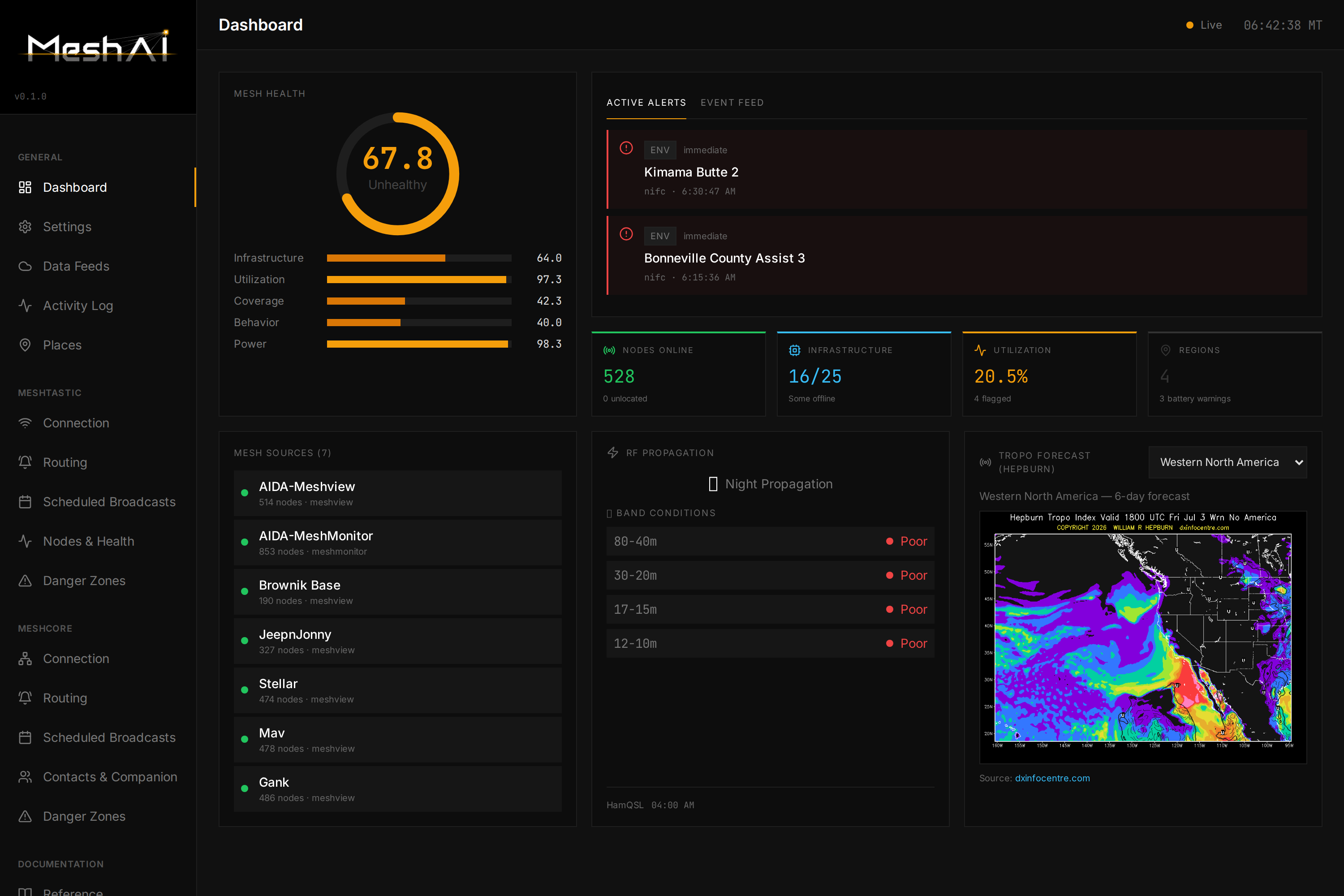
Highlights
- Dual-transport — runs on Meshtastic and MeshCore simultaneously. Each mesh is first-class: independent connection, routing, and behavior, one shared brain.
- Conversational bot — DM it "how's the mesh?" or ask about weather, fires, roads, or a specific node, and get a data-driven answer over LoRa. The reply goes back on whichever mesh you asked from.
- Per-mesh awareness — it watches chat on each mesh separately (rolling short-term memory), so "what's happening on the mesh?" answers about your mesh. Private DMs stay private; curated knowledge stays separate.
- Broadcast intelligence — weather alerts, wildfire updates, road/traffic, seismic, RF/band conditions, and mesh-health notifications, formatted to fit LoRa and routed per-mesh, per-family.
- Mesh health — a 5-pillar health score with per-region breakdowns, infrastructure monitoring, coverage-gap analysis, and battery/solar tracking (Meshtastic).
- Web dashboard — a clean React UI to configure every transport, route every message type, watch a live activity feed, browse contacts, and tune the bot — no config-file spelunking required.
- Knowledge base (RAG) — optional hybrid retrieval over a large curated vector store for survival/comms/technical Q&A.
- Multi-backend LLM — Google Gemini, OpenAI, Anthropic, or any OpenAI-compatible local model (Ollama, LiteLLM, etc.).
The dashboard
Everything is driven from the web UI, organized into General, Meshtastic, and MeshCore sections — each mesh mirrors the other so there's nothing to relearn when you add the second transport.
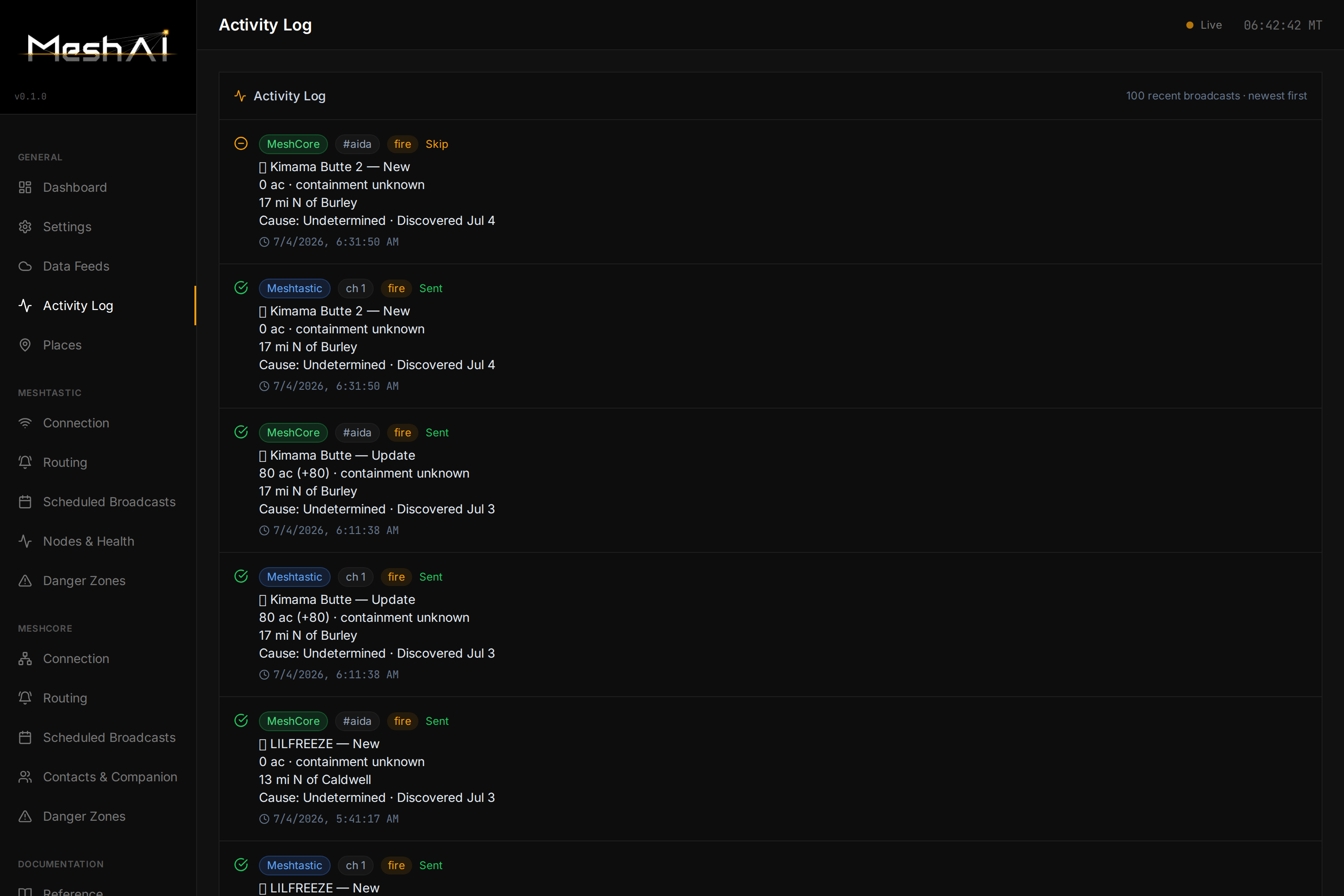
Live activity log — every broadcast, on both meshes, with per-mesh badges and Sent/Skip status:
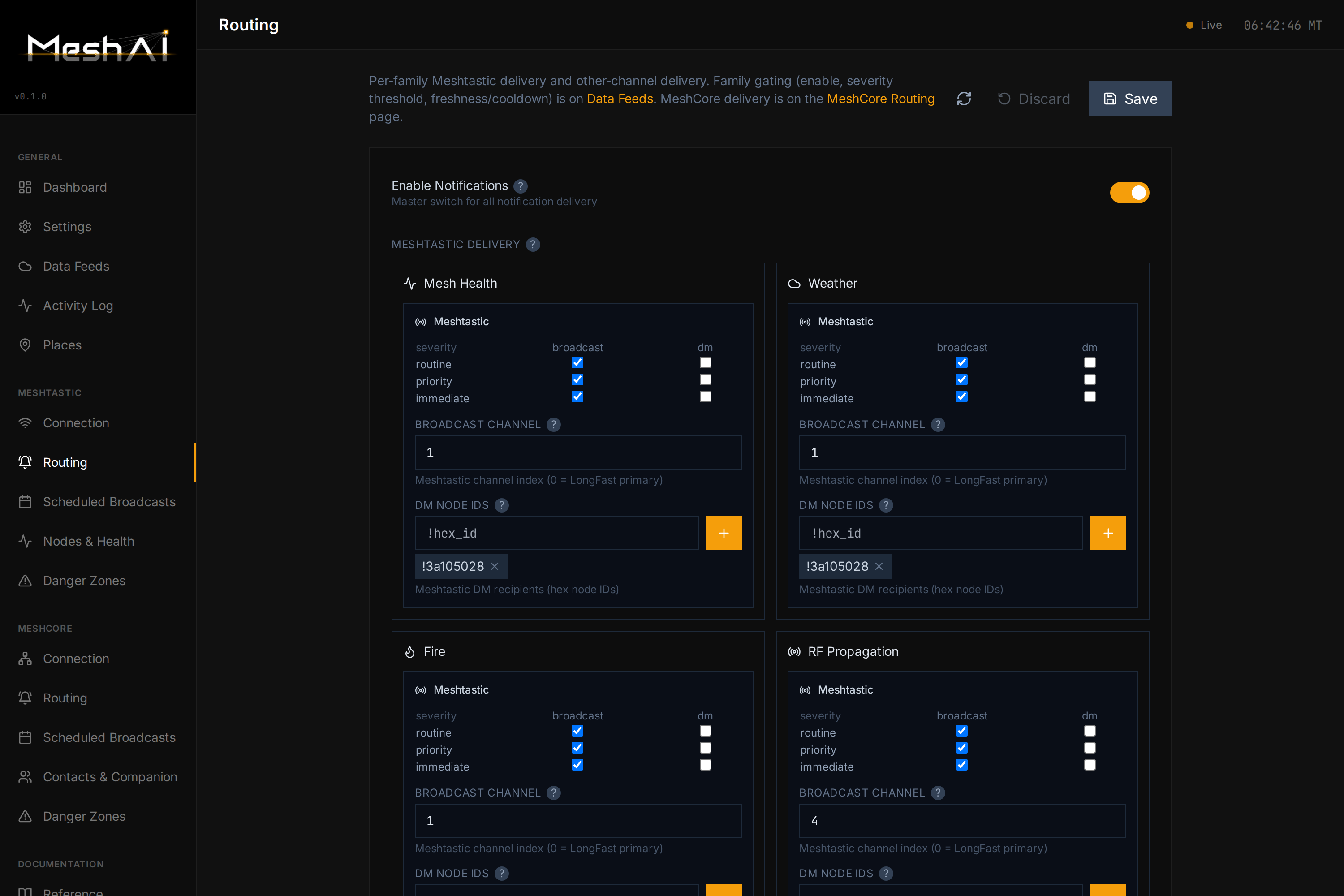
Per-family routing — decide exactly where each message type goes: broadcast vs. DM, which channel, which recipients — independently for each mesh:
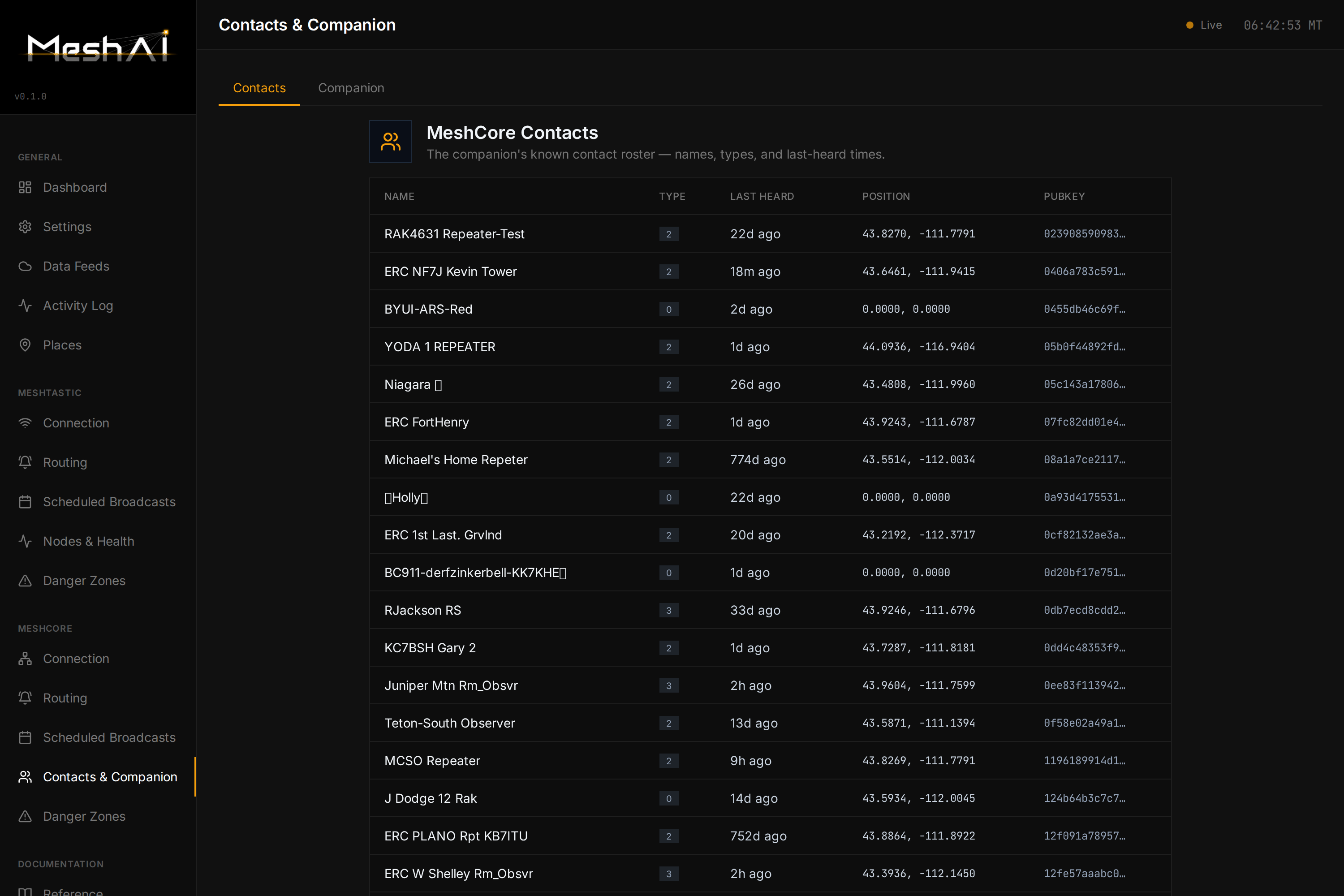
MeshCore contacts & companion — the live roster from your MeshCore companion node, with names, types, last-heard, position, and optional telemetry polling:
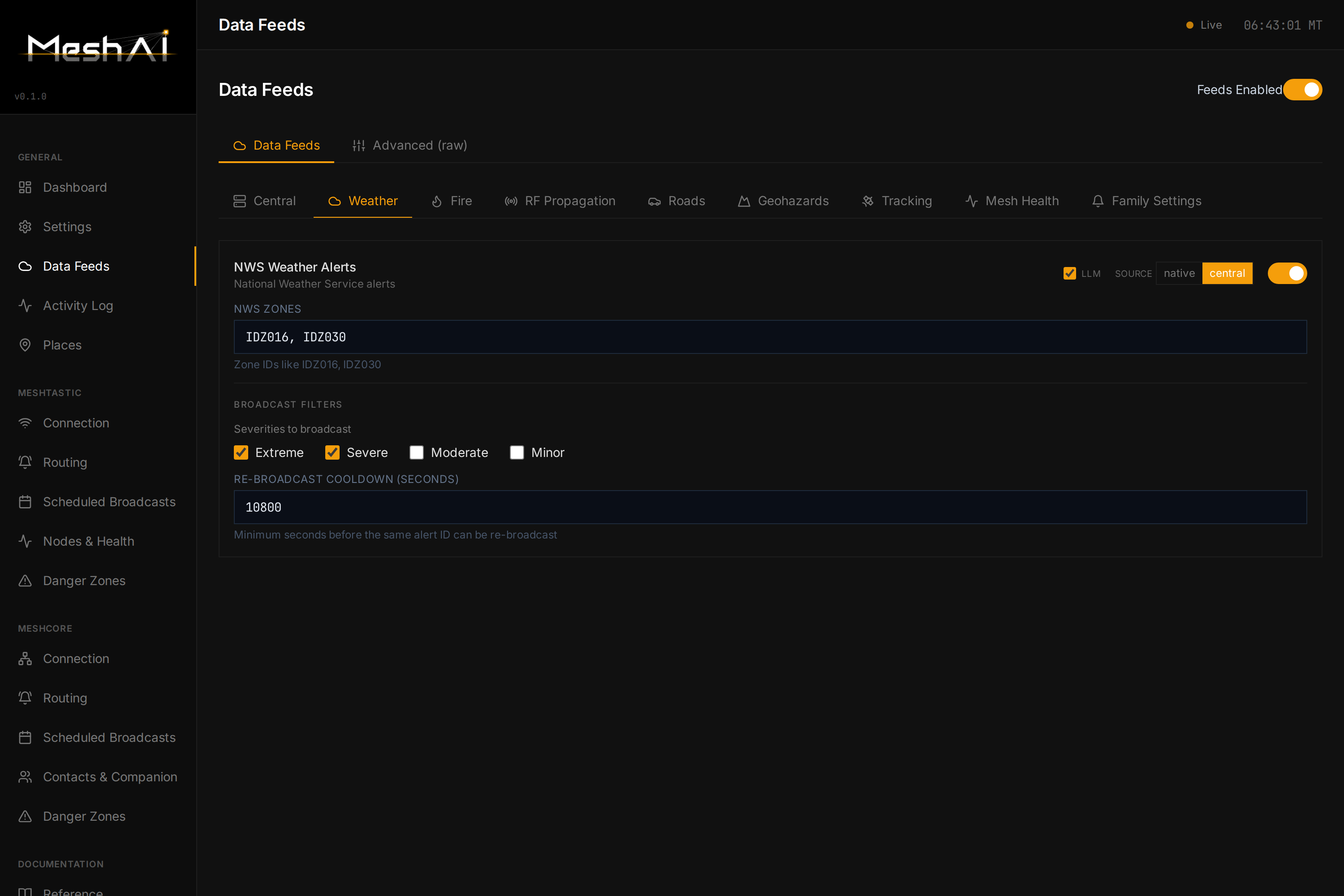
Data feeds — turn environmental sources on/off and tune thresholds in one place:
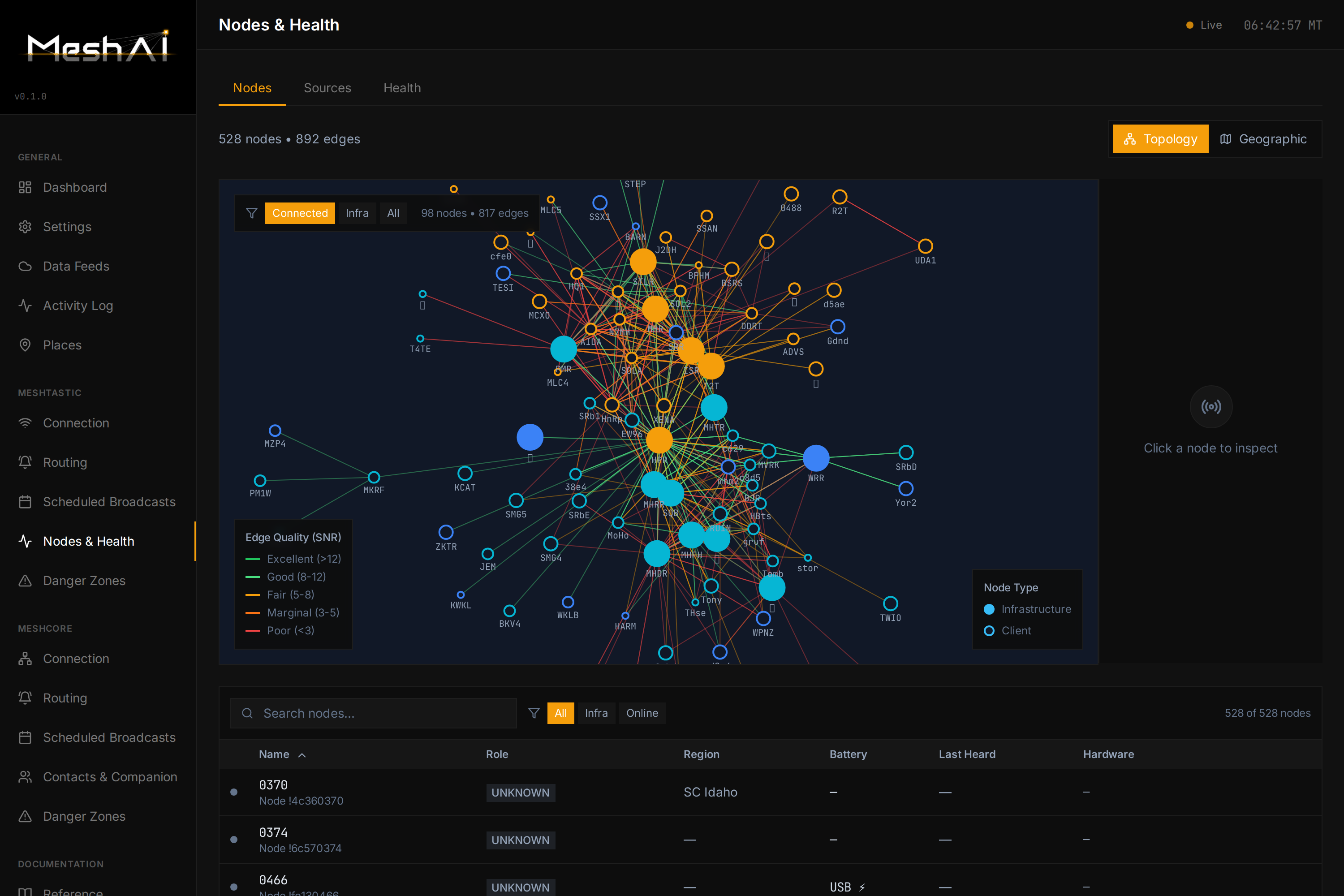
Nodes & health — per-node infrastructure detail: battery, utilization, coverage, neighbors, hardware:
Quick start
git clone https://github.com/zvx-echo6/meshai.git
cd meshai
pip install -e .
cp config.example.yaml config.yaml   # then edit config.yaml (or use the dashboard)
meshai
Or with Docker:
mkdir -p meshai/data && cd meshai
curl -O https://raw.githubusercontent.com/zvx-echo6/meshai/main/docker-compose.yml
curl -o data/config.yaml https://raw.githubusercontent.com/zvx-echo6/meshai/main/config.example.yaml
# edit data/config.yaml, then:
docker compose up -d
The dashboard comes up on http://localhost:8080.
Transports
MeshAI speaks two mesh protocols. Meshtastic is always the base transport. MeshCore turns on automatically the moment you set a MeshCore host — there's no separate on/off toggle to forget.
Meshtastic
Connect over TCP (recommended) or serial:
connection:
  type: "tcp"           # or "serial"
  tcp_host: "192.168.1.100"
  tcp_port: 4403
  # serial_port: "/dev/ttyUSB0"
MeshCore
MeshAI attaches to a MeshCore companion (the pyMC / MeshCore companion frame server) over TCP and acts as a node on the MeshCore mesh:
connection:
  meshcore_host: "192.168.1.253"   # blank = MeshCore off
  meshcore_port: 5050
Once connected, MeshCore gets its own Connection, Routing, Scheduled Broadcasts, Contacts & Companion, and Danger Zones pages in the dashboard — the same capabilities as Meshtastic, using MeshCore's own idioms (channels by name, contacts by pubkey). Messages are sized to fit whichever mesh they go out on.
The conversational bot
DM MeshAI on either mesh and it answers with the LLM, using live mesh data, environmental feeds, and (optionally) a knowledge base. A few things it's careful about:
- Answers on the mesh you asked from. A MeshCore DM gets a MeshCore reply; a Meshtastic DM gets a Meshtastic reply. Each mesh's "answer DMs" switch is independent.
- Per-mesh chat memory. It keeps a short rolling window of recent channel chatter per mesh (configurable retention, default 14 days) so "what's happening on the mesh?" reflects the mesh you're on. Ask about the other mesh by name to cross over.
- Three separate lanes. Shared channel context, your private DM history, and the curated knowledge base never bleed into each other.
- LoRa-fit replies. Responses are chunked to a per-mesh character budget with sentence-aware splitting and continuation prompts.
Commands
Alongside natural-language questions, a set of ! commands are available (all toggleable, so they can defer to another service like MeshMonitor):
| Category | Commands |
|---|---|
| Mesh | !health · !mesh · !status · !region [name] · !neighbors [node] |
| Weather / RF | !wx-alerts · !solar · !hf · !satpass |
| Fire | !fire · !hotspots · !ignitions |
| Hazards | !avalanche · !roads / !traffic · !rivers / !gauges |
| Utility | !help · !clear |
Mesh intelligence (Meshtastic)
MeshAI continuously aggregates mesh data and computes a 5-pillar health score:
| Pillar | Weight | Measures |
|---|---|---|
| Infrastructure | 30% | Router/repeater uptime |
| Utilization | 25% | Channel busyness / RF congestion |
| Coverage | 20% | How many monitoring sources see each node |
| Behavior | 15% | Traffic patterns (noisy/misconfigured nodes) |
| Power | 10% | Battery health of infrastructure nodes |
Infrastructure nodes are tracked individually (battery, offline alerts, coverage, neighbors, hardware); client nodes coming and going is normal and ignored. Regions are fully configurable — local names, aliases, cities, and radius — with no hardcoded geography.
Data comes from one or more Meshview instances and a MeshMonitor instance, polled on a staggered schedule with built-in rate-limiting:
mesh_sources:
  - name: "meshview"
    type: meshview
    url: "http://192.168.1.100:8080"
    enabled: true
  - name: "meshmonitor"
    type: meshmonitor
    url: "http://192.168.1.100:3333"
    api_token: "your-bearer-token"
    enabled: true
Environmental & hazard feeds
MeshAI pulls real-time situational data and turns it into LoRa broadcasts and query answers. Sources include NWS weather alerts, NIFC wildfire perimeters, NASA FIRMS satellite fire detections, USGS earthquakes, USGS stream gauges, road/traffic (511 / TomTom), NOAA space weather, and avalanche/RF-propagation feeds.
Everything is switched on/off and tuned from the dashboard's Data Feeds page — enable a source, set thresholds and geography, and route its output per-mesh on the Routing page. Broadcast wording is tightened to fit a single LoRa packet without dropping the important details (e.g. affected towns on a weather alert).
Native adapters vs. Central
Each hazard feed can get its data one of two ways, chosen per-feed with a feed_source switch:
native— MeshAI fetches the source's public API directly (api.weather.gov, NIFC, USGS, NOAA SWPC, NASA FIRMS, TomTom, 511, avalanche centers). Self-contained — no extra infrastructure. This is the default and the original data path.central— MeshAI subscribes to Central, a companion service that pre-aggregates the same hazard data and republishes it as a NATS JetStream firehose, so many bots/nodes can share one set of upstream API calls and geo/severity filtering instead of each hammering the source APIs.
environmental:
  central:
    enabled: true
    url: "nats://central.echo6.mesh:4222"   # NATS server (tailnet-gated, no auth)
    durable: "meshai-consumer"              # durable consumer name prefix
    region: "us.id"                         # server-side subject filtering
    connect_timeout: 10
  nws:   { feed_source: central }           # this feed comes from Central …
  fires: { feed_source: native }            # … this one is fetched directly
  # …one feed_source per hazard adapter
Native and Central are mutually exclusive per feed — flip any adapter between them independently. Two special cases: satpass is Central-only (there's no native predictor), and ducting (VHF tropo) is native-only (no Central equivalent). MeshAI keeps running whether or not Central is up: a runtime drop auto-reconnects (durable consumers resume where they left off), and a startup outage is logged and retried in the background rather than blocking boot — the LLM bot, both transports, mesh-health, and any native feeds all come up regardless; only the Central-sourced hazard feeds wait for Central to return. Feeds set to native don't depend on Central at all.
Knowledge base (RAG)
Optional hybrid retrieval for survival, comms, medical, and technical Q&A.
- Primary — queries a Qdrant hybrid store (dense
bge-m3+ sparse, Reciprocal Rank Fusion) over a large curated vector set, via a networked TEI embedding service. Nothing is copied locally. - Fallback — a local SQLite knowledge base (FTS5 keyword +
bge-small-en-v1.5vectors) if the vector service is unreachable.
knowledge:
  enabled: true
  backend: auto          # qdrant | sqlite | auto
  qdrant_host: "192.168.1.150"
  qdrant_port: 6333
  qdrant_collection: "recon_knowledge_hybrid"
  tei_host: "192.168.1.150"
  tei_port: 8090
  top_k: 5
The curated channel chatter your bot observes is used only as short-term context — it is never written into the knowledge base.
LLM configuration
llm:
  backend: "google"          # google | openai | anthropic
  api_key: "your-api-key"
  model: "gemini-3.1-flash-lite"
Any OpenAI-compatible endpoint works for local models — point base_url at Ollama (http://localhost:11434/v1), LiteLLM (http://localhost:4000/v1), or Open WebUI.
Architecture
                       ┌─────────────────────────────┐
   Meshtastic ────────▶│                             │◀──────── MeshCore
   (TCP / serial)      │      CompositeTransport      │     (companion / pyMC TCP)
                       │   per-mesh routing + sizing  │
                       └──────────────┬──────────────┘
                                      │
        ┌─────────────────────────────┼─────────────────────────────┐
        ▼                             ▼                             ▼
  ┌───────────┐              ┌─────────────────┐            ┌──────────────┐
  │  Router   │              │  Notification    │            │  Mesh Data   │
  │ LLM / cmd │              │  Pipeline        │            │  Store +     │
  │ DM gating │              │  weather · fire  │            │  Health      │
  │ per-mesh  │              │  road · seismic  │            │  Engine      │
  │ context   │              │  RF · mesh-health│            │  5-pillar    │
  └─────┬─────┘              └────────┬─────────┘            └──────┬───────┘
        │                            │                              │
   ┌────▼─────┐   ┌──────────────┐   │        ┌──────────────┐      │
   │   LLM    │   │  Knowledge   │   │        │ Env / Central │◀─────┘
   │ backend  │   │  Qdrant/FTS5 │   │        │ feed adapters │
   └──────────┘   └──────────────┘   ▼        └──────────────┘
                                ┌──────────┐
                                │ Responder│  ACK-paced, LoRa-fit,
                                │ + Chunker│  routed per mesh
                                └──────────┘
                                      │
                              Web Dashboard (React) ── configure everything
Running as a service
# /etc/systemd/system/meshai.service
[Unit]
Description=MeshAI
After=network.target

[Service]
Type=simple
User=your-user
WorkingDirectory=/path/to/meshai
ExecStart=/usr/bin/python3 -m meshai
Restart=always
RestartSec=10

[Install]
WantedBy=multi-user.target
sudo systemctl daemon-reload
sudo systemctl enable --now meshai
Every deployment is designed to survive a reboot; the dashboard's connection settings drive both transports.
Playing nice with other services
- advBBS — MeshAI coexists on the same Meshtastic node; BBS protocol traffic (sync, RAP, mail) is auto-filtered (
bot.filter_bbs_protocols: true). - MeshMonitor — MeshAI reads MeshMonitor's auto-responder patterns to avoid duplicate replies, and uses its API as a mesh-intelligence data source.
- MeshCore companion — MeshAI attaches as its own companion identity so it can share the radio without evicting other companion clients.
Acknowledgments
- Meshtastic — the mesh platform it started on
- MeshCore & pyMC — the second transport
- MeshMonitor by Yeraze — monitoring integration & data source
- advBBS — coexistence design
- Qdrant · sqlite-vec · fastembed — retrieval stack
- The LLM coding assistants that vibecoded most of this
License
MIT
Author
K7ZVX — matt@echo6.co